


Top 5 Free Tools to Create Posters for College Events Like a Pro
How to Design Eye-Catching Posters for School and College Events on a Budget
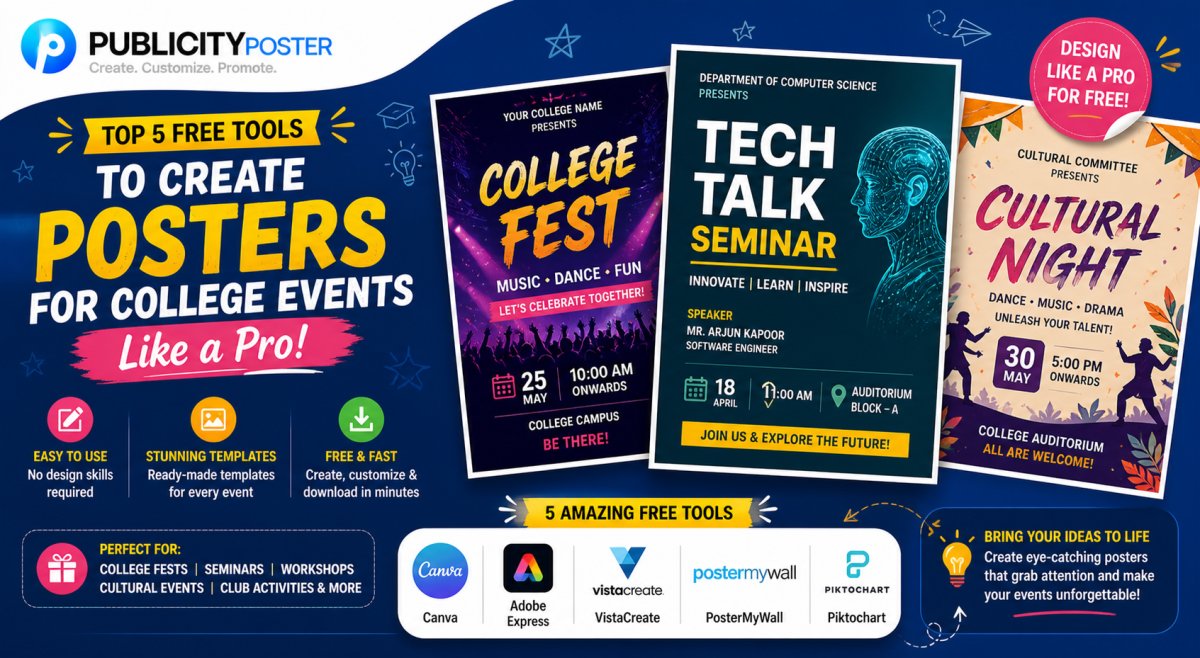
Let’s be honest—college events are nothing without some hype. Whether you're organizing a cultural fest, academic seminar, or inter-college battle of the bands, one thing can make or break your turnout: the event poster.
But if you're a student or faculty member working with a tight budget (read: zero), hiring a professional designer may be off the table.
Don’t worry—you don’t need a degree in graphic design to create posters that turn heads. All you need is the right tool and a little creativity.
In this article, we're breaking down the top 5 free tools to create amazing posters for your college or school events—no design experience needed.
Why Good Posters Matter for Student Events
Before we jump into the tools, let’s talk about why poster design deserves your attention:
-
📌 First impressions count: Your poster is often the first thing people see about your event.
-
📢 They generate buzz: A cool design makes people more likely to share it online or stop to read it on campus.
-
🧠 They help people remember: Visuals stick. A well-designed poster can boost event turnout and awareness.
So yes, your poster isn't just decoration—it's your first marketing weapon.
Top 5 Free Tools to Create Stunning Posters for Student Events
Here are five free (and beginner-friendly) poster design platforms that will help you look like a pro—even if you're just winging it during midterms.
✅ 1. Canva
Best for: Beginners who want professional-looking results fast
Platform: Web, iOS, Android
Price: Free (with optional Pro version)
Why it rocks:
Canva is a go-to design platform for students, clubs, and event organizers. It offers hundreds of free templates for posters, flyers, and social media posts. Just pick a template, drag and drop your text and images, and you're done.
Features you’ll love:
-
Ready-to-use templates for events
-
Free icons, fonts, and images
-
Collaborative editing (perfect for team projects)
Pro tip: Stick to your event’s theme colors for a cohesive look.
✅ 2. Adobe Express (Formerly Adobe Spark)
Best for: Quick, stylish designs with Adobe-quality polish
Platform: Web, iOS, Android
Price: Free basic plan
Why it rocks:
Adobe Express is a lightweight, browser-based design tool with the clean polish you’d expect from Adobe. It's perfect for creating bold, modern event posters with minimal effort.
Features you’ll love:
-
Pre-made poster layouts
-
Clean UI and easy navigation
-
Built-in access to free stock photos
Pro tip: Use animated poster templates if you plan to promote your event online.
✅ 3. Crello (Now VistaCreate)
Best for: Motion graphics and modern design trends
Platform: Web, iOS, Android
Price: Free (Pro version available)
Why it rocks:
VistaCreate (previously Crello) is similar to Canva but with a stronger emphasis on animation and eye-catching visual effects—great for social media posters or event promos.
Features you’ll love:
-
Animated templates
-
Trendy fonts and effects
-
Large library of design elements
Pro tip: Use animated posters for Instagram Stories or digital notice boards on campus.
✅ 4. PosterMyWall
Best for: Event-specific designs (concerts, parties, fests)
Platform: Web
Price: Free (watermark-free downloads may require payment)
Why it rocks:
PosterMyWall is tailor-made for event promotions. From music nights to talent shows, you’ll find highly specific templates that make your job easier.
Features you’ll love:
-
Event-focused categories
-
Easy drag-and-drop interface
-
Print-ready downloads
Pro tip: Download your poster in high-res format for campus printing or banners.
✅ 5. Piktochart
Best for: Academic events and presentations
Platform: Web
Price: Free basic plan
Why it rocks:
Piktochart isn’t just for infographics—it’s also perfect for clean, data-driven posters ideal for academic seminars, science fairs, or business club events.
Features you’ll love:
-
Easy chart and graph creation
-
Professional templates for academic use
-
Sleek, minimalist design styles
Pro tip: Use it when your event is more info-heavy and needs a cleaner layout.
Bonus Tips for Killer College Event Posters
Even with the best tools, a great poster needs some thoughtful touches:
-
Keep text minimal and clear
People should get the “what, when, where” in under 5 seconds. -
Use bold visuals
A striking image or bold color grabs attention—even from across the hallway. -
Match the vibe
A poster for a tech fest should feel different from one for a dance night. -
Don’t forget digital
Once your poster is ready, resize it for Instagram, WhatsApp, or your college’s website.
You don’t need a graphic design degree—or a big budget—to create posters that attract attention and pack your event with people.
With these free tools and a bit of creativity, your college event can look just as exciting on a poster as it feels in real life.
So next time you’re organizing an event, skip the boring Word doc flyers and design something people actually want to look at.
What's Your Reaction?
 Like
0
Like
0
 Dislike
0
Dislike
0
 Love
0
Love
0
 Funny
0
Funny
0
 Wow
0
Wow
0
 Sad
0
Sad
0
 Angry
0
Angry
0

Hi, I’m Kalpana 👋 A passionate content writer who loves turning ideas into simple, engaging, and result-driven content. I specialize in creating blog posts, marketing content, and practical guides that help businesses grow and connect with their audience. My focus is always on clarity, value, and writing that actually makes an impact—not just fills space. At Publicity Poster, I write content that helps businesses understand how to promote themselves better, create stunning posters, and grow faster using smart tools. When I’m not writing, I enjoy exploring new ideas, learning about marketing trends, and finding better ways to communicate complex things in simple words. 💡 I believe: Great content is simple, useful, and powerful.
Comments (0)